
How to Check UAE Visa Status With Passport Number
Keeping track of your visa status is important when staying in the UAE, whether you're a resident, employee, or visitor. Fortunately, the process of checking your visa details online is quick and straightforward—especially when you have your passport number ready. The UAE government provides official platforms like the ICP Smart Services portal, which covers most Emirates, and the GDRFA portal, used primarily for Dubai-issued visas. Let’s see how you can check your visa status step by step.
Please note: Kredium is not affiliated with UAE immigration services and cannot check or process your visa status. This article is for informational purposes only to help you use official government portals like ICP and GDRFA.
Documents You’ll Need Before Checking
Before you check your UAE visa status online, make sure you have the right details ready. This will help you avoid errors and get results quickly, especially when using official websites like ICP or GDRFA. The type of visa you have—whether it’s for work, residency, or a short visit—can affect what information you’ll need to enter.
Key Documents for Residents and Work Visa Holders
If you are a resident or have a UAE work visa, here are the main details you’ll need:
Passport number – Ensure it matches exactly with your official documents.
Passport expiry date – Required when searching through the ICP Smart Services portal.
Nationality – To be selected from a dropdown menu during the search.
Emirates ID number – In some cases, this can be used as an alternative search option.
Visa file number – May be needed if checking via the GDRFA portal, especially for Dubai-issued visas.
Having your Emirates ID or visa copy nearby is useful if any additional fields need to be filled during verification.
Required Details for Visit and Tourist Visa Inquiries
For short-term visitors, including those on tourist or visit visas, these are the details typically needed:
Passport number and expiry date – Both are essential for online searches.
Nationality – Select this carefully to ensure an accurate result.
Entry permit number – May be required in some cases, especially when checking through GDRFA.
Visa reference number – Provided by your travel agency or sponsor, if applicable.
If your visa was arranged through a third party (e.g. airline, hotel, or travel agency), it's a good idea to keep their reference handy in case additional verification is needed.
Steps to Check Your Visa Status With Passport Number
You can easily check your UAE visa status online using just your passport number. This method works through the official ICP (Federal Authority for Identity and Citizenship) portal and is suitable for both residents and visitors. Make sure your passport details are correct and up to date before starting the process.
1. Access the ICP Smart Services Portal
Start by visiting the ICP Smart Services website. This is the official platform used to access a wide range of visa and residency services across the UAE (excluding Dubai-issued visas in some cases).
Note: If your visa was issued in Dubai, you may need to check your status via the GDRFA (General Directorate of Residency and Foreigners Affairs) portal instead.
If the website opens in Arabic, switch to English by using the language selector at the top of the page.
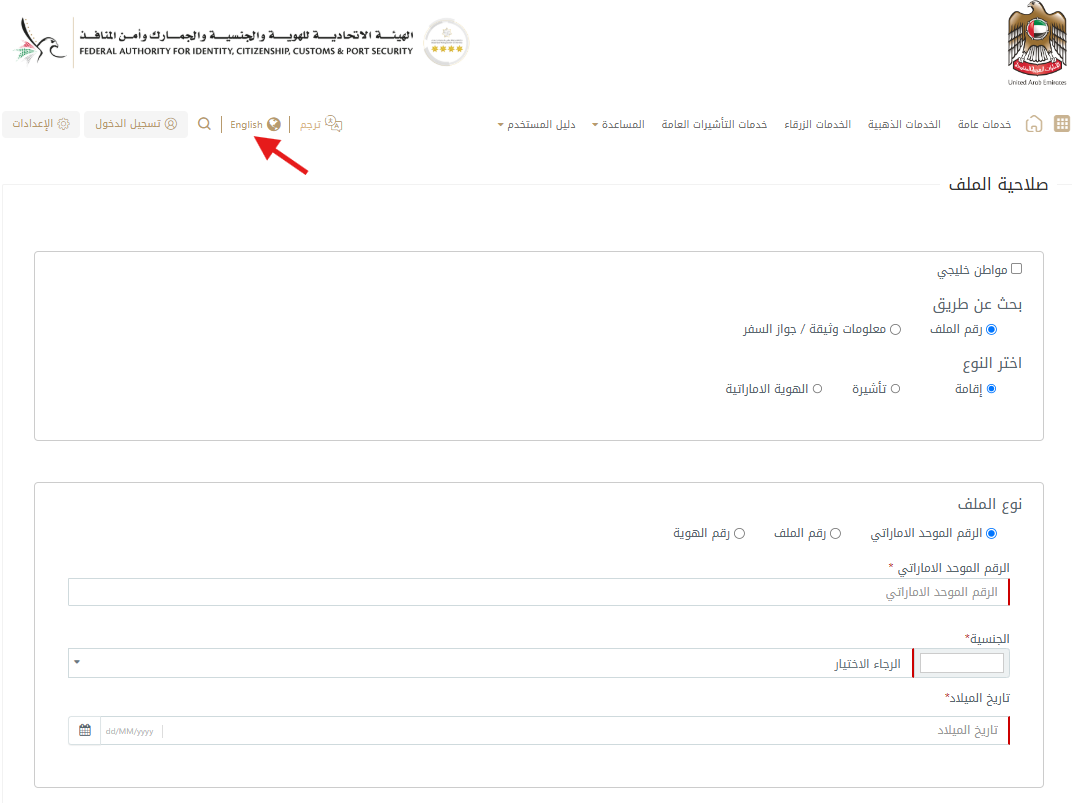
2. Choose the Appropriate Search Method
Once you’re on the site:
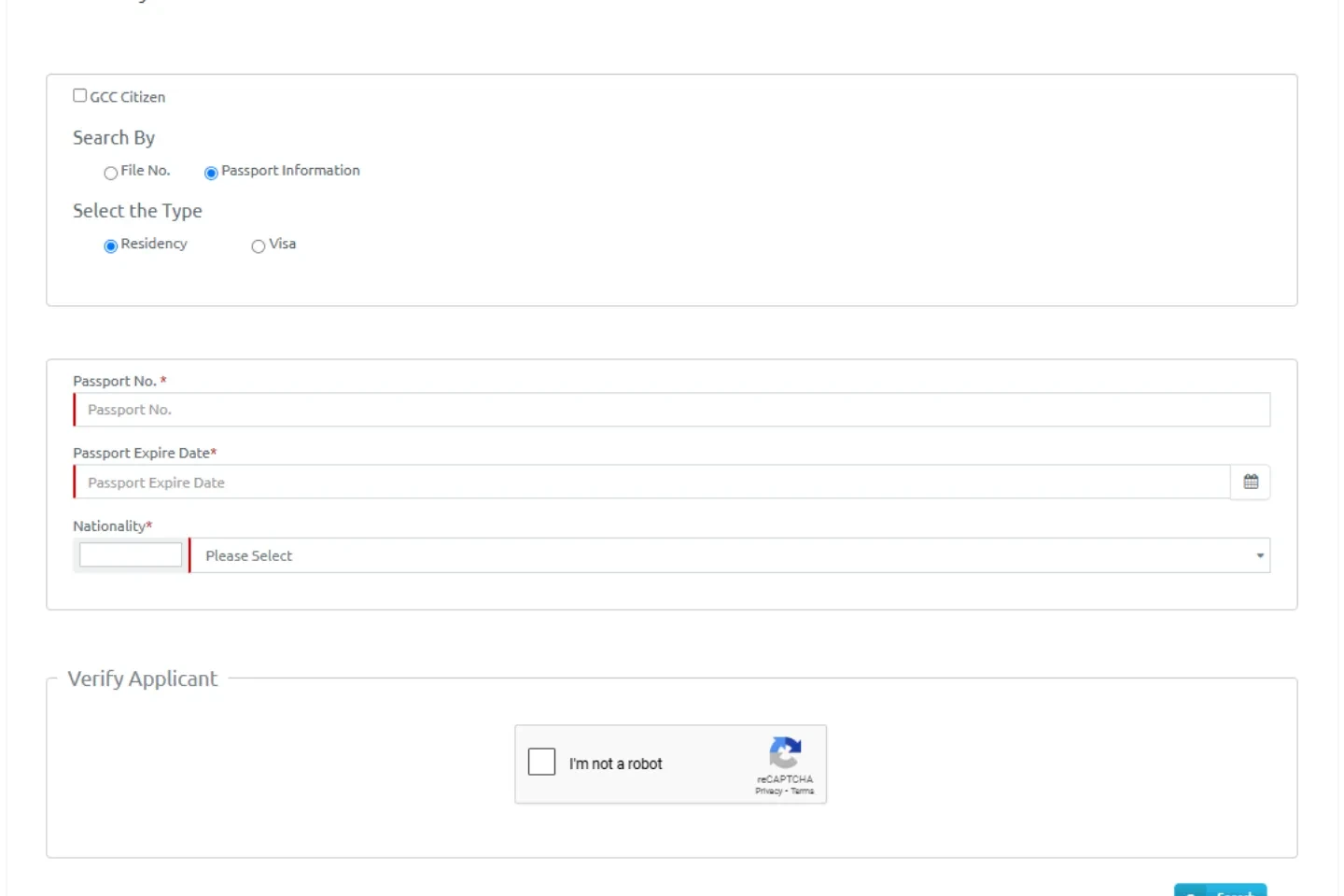
Go to the “Passport Information” tab under the “Search By” section.
Select the visa type you want to check:
Visa – for visit or tourist visa holders
Residency – for UAE residents and work visa holders
Choosing the correct category is important to get accurate results. Take a look at the photo below to see how the page looks:
3. Enter Your Personal Details
Next, enter the following:
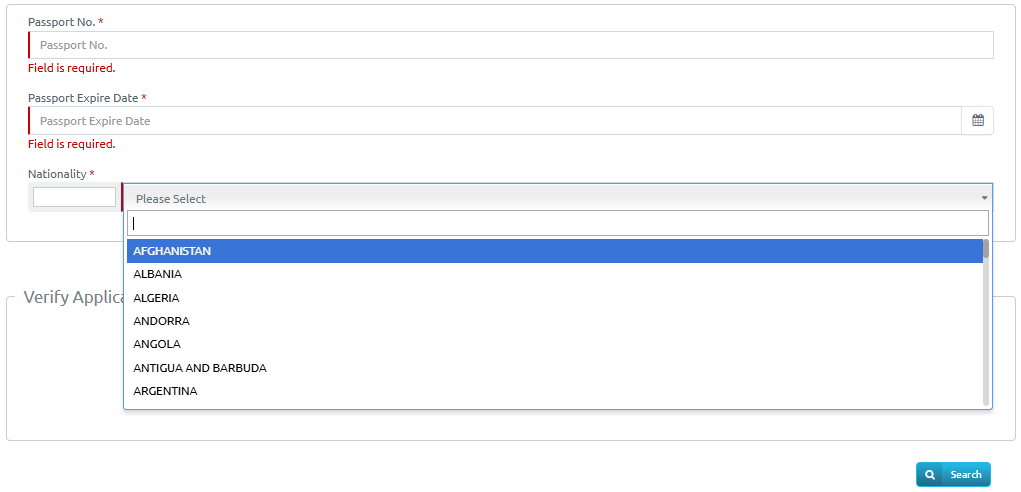
Passport number the required details carefully:
Passport expiry date
Nationality (choose from the dropdown list)
If you're a resident, you may also have the option to use your Emirates ID instead of passport details.
Double-check all entries before moving on to the next step.

4. Complete Verification and View Visa Details
To complete the process:
Check the Captcha box to verify you’re not a robot.
Click the Search button.
If all details are correct, your visa status will appear on the screen. You’ll be able to see key information such as your visa validity, expiry date, and type.
FAQs About Checking Visa Status Online
Here are clear answers to some of the most frequently asked questions about verifying your UAE visa status, including different methods and what details you’ll need.
1. How do I check my UAE visa status using the UID number?
You can check your UAE visa status by entering your UID number on the official ICP or GDRFA portal, depending on where your visa was issued. Along with the UID, you may need to provide additional details such as your nationality or passport number to view your visa's current status and validity.
2. Is it possible to check my UAE visa status by passport number without using the ICP website?
Yes, you can check your UAE visa status without using the ICP website. For general UAE visa inquiries, you can call the Federal Authority for Identity and Citizenship at 600-522-222. For Dubai-specific visa status checks by passport number, contact the Amer Centre at 800-5111 or +971-4-313-9999 if calling from abroad.
3. How can I check my visa cancellation status in the UAE in 2025?
To check your visa cancellation status in the UAE, visit the ICP Smart Services portal or the GDRFA website (for Dubai-issued visas). Use the “File Validity” or “Visa Status” section by entering your passport number, visa file number, and other required details. If your visa has been cancelled, the system will show it as invalid or no longer active.
4. How can I verify if a UAE visa is genuine?
To verify a UAE visa's authenticity, check for the official UAE emblem, which should be clearly visible on every original visa issued for Dubai. Additionally, genuine visas include a barcode that can be scanned to access the UAE immigration system for confirmation.
5. How can I find out if my UAE visa application has been rejected?
To check if your UAE visa application was rejected, visit the official website of the relevant embassy or visa processing center. You’ll typically need to enter details such as your passport number, application ID, tracking number, and interview location to view your visa status.
6. Can you call to check visa status?
Checking your visa or citizenship application status by phone is possible, but if your application is still within the usual processing time, information may be limited. For online applications, always use the official portal for updates.
Conclusion
Checking your UAE visa status online is quick and simple once you know where to look and what details to enter. You might need to confirm your visa's validity, check the expiry date, or prepare for renewal—the process only takes a few minutes. Just follow the steps, keep your documents ready, and stay informed to avoid any last-minute surprises.
While we don’t offer visa services, you can browse through Kredium’s selection of properties for sale and rent or get expert real estate advice—everything you need to move forward with confidence and clarity.
Photo Credits: Pexels